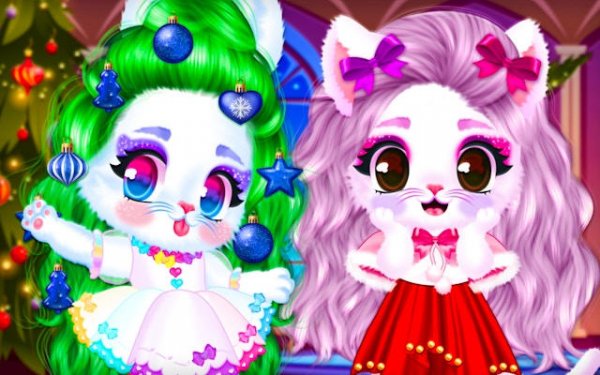
Cozy Snowy Stylist keeps its scope narrow and executes it clearly. The cat-or-rabbit choice, four clothing categories, and layered winter garments give children enough decisions to stay engaged without overwhelming them. Optional hairstyles and subtle makeup add personalization, while photo mode provides a satisfying endpoint. The absence of timers, scores, and wrong answers makes it suitable for preschoolers and older kids seeking a low-pressure creative activity. The main limitation is that it offers no challenge or progression beyond making and saving outfits.
Cozy Snowy Stylist begins with a simple choice: cat or rabbit. Each animal has a distinct look that changes how clothing sits on the body, so the same sweater reads differently depending on which character is selected. The wardrobe is split into upper garments, lower garments, footwear, and accessories. Tapping any item places it on the character immediately, and the icons are large and clearly labeled, which keeps navigation manageable for preschoolers. Because there is no timer, players can cycle through as many combinations as they want before deciding on a final look.
Winter dressing in this game is not a single-piece decision. Sweaters can be placed over shirts, and coats can be placed over sweaters, with each added layer visibly changing the character's silhouette. That layered approach makes outfits look progressively warmer and gives young players a concrete way to see how garments interact. Color options cover icy blues and whites as well as warmer reds and yellows, so children can test matching or contrasting combinations. Feedback is immediate and visual, which helps players connect color and layering choices to the finished outfit.
A separate makeover station handles hair and light cosmetic changes. Players can select from different hairstyle cuts and colors, and a few subtle options such as cheek blush or eyelash color are available. These additions stay age-appropriate and do not overshadow the clothing system. The makeover section is entirely optional, so a child who only wants to dress the character can ignore it without losing access to the main wardrobe.
When an outfit is finished, photo mode places the dressed character in a snowy backdrop with optional props like a sled or a snowflake. Players can position the character and take a snapshot, then save the image to the device gallery for sharing with family. This gives the dressing process a clear endpoint and encourages children to build several outfits to compare how each one looks in the winter scene.
The game avoids competitive pressure by design. There are no points, no countdowns, and no incorrect combinations, so every outfit is accepted as valid. Undo and redo buttons let players backtrack if they want to try a different direction. That structure suits very young children who are still developing fine motor skills, as well as older kids who want a calm creative activity rather than a challenge to beat.
Sign in to comment
You must be logged in before posting a review or rating.
No comments yet. Be the first to comment!





Editorial Notes